

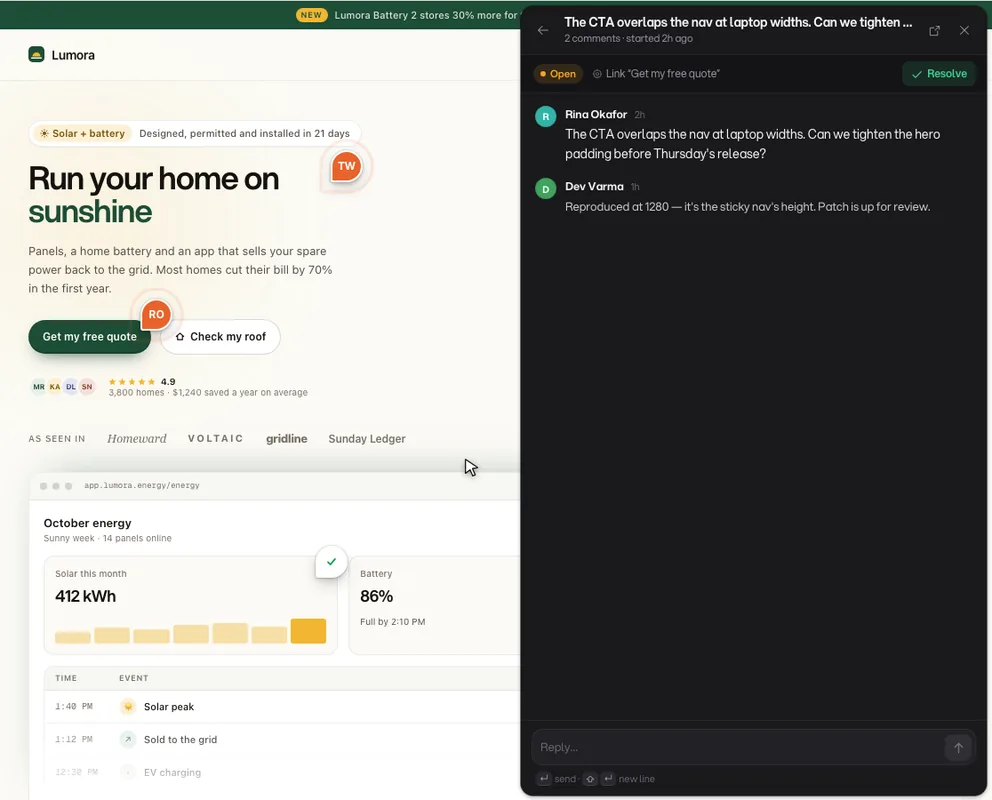
Comment anywhere on your live website

The website feedback tool that turns scattered screenshots, Slack threads, and tickets into comments pinned to the exact element — for product teams, agencies, QA, and designers.

  • Free forever plan
  • No credit card
  • Reviewers need no account
app.yoursite.com/pricing
RO

Rina Okafor

2h ago on /pricing

Open

The CTA overlaps the nav at laptop widths. Can we tighten the hero padding before Thursday's release?

main > section.hero > a.cta

Chrome 1261440 × 900production
DV

Reply to thread

Feedback lands in the tools your team already lives in. Eleven providers, no glue code.

  • Slack
  • Linear
  • Jira
  • GitHub
  • GitLab
  • Asana
  • Trello
  • Microsoft Teams
  • Discord
  • Email
  • Webhooks
  • All eleven

Every comment, conversation, request, and number about your product, in one inbox — pinned to the pixel it came from.

Anchored, not attached

A comment holds the DOM node it was left on, so it survives scrolling, resizing, and your next deploy.

One inbox, four surfaces

Feedback, live chat, public requests, and analytics share a team, a project key, and a place to land.

One script tag

No SDK to wire up, no staging rebuild, and no browser extension for the people reviewing your work.

THE PLATFORM

Four surfaces, one workspace

Annot8 is not a single widget bolted onto your site. It is four surfaces that share one inbox, one team, and one project key — so feedback, conversations, requests, and the numbers behind them all live in the same place.

The Annot8 project inbox listing feedback threads, each showing the page path and the CSS selector of the element it was pinned to, with issue type, priority, and assignee.

VISUAL FEEDBACK

Pin a comment to the exact element

Click any element and leave a comment right there, or drag to mark a whole region. Every thread arrives with the browser, viewport, and URL already attached.

  • Screenshots of the element or the full viewport
  • Screen recordings with console errors and failed requests
  • Voice notes when typing it out is slower
  • Issue types, labels, priorities, and assignees
The Annot8 live chat inbox, with a visitor conversation open and an AI assistant reply suggested alongside the team's own messages.

LIVE CHAT

The same widget answers questions

Conversations land in the dashboard next to your feedback instead of in a separate tool, with the same team and the same inbox.

  • An AI assistant that replies from your own context
  • Full appearance control over the launcher and panel
  • Typing indicators, read receipts, and conversation ratings
The Annot8 feedback portal showing public posts ranked by upvotes, each tagged with a board and a roadmap status such as planned, under review, or in progress.

FEEDBACK PORTAL

A public board your users can vote on

Users post ideas, upvote what matters, and watch the roadmap move from open to under review to planned to in progress.

  • Hosted at annot8.app/p/your-workspace
  • Boards you define, with moderation and triage
  • Shareable feedback links and questionnaires
The Annot8 analytics overview with unique visitors, page views, average session length and bounce rate, a visitors trend chart, traffic sources, and a top pages table.

PRODUCT ANALYTICS

Whether the fix actually mattered

Know what changed after you shipped, without bolting a second script onto the page.

  • Visitors, sessions, pageviews, and bounce rate
  • Traffic sources, devices, and top pages
  • Funnels, custom events, and a real-time view

AI TRIAGE

The pile thins itself

Feedback tools fail at volume, not at zero. Annot8 reads every thread as it arrives so the inbox stays a queue instead of becoming an archive.

New threads are checked against existing feedback, so the fifth report of the same bug gets merged into the first instead of starting its own pile.

Each thread comes in with a suggested type, a suggested priority, and a summary — so triage is mostly done before you open the inbox.

Annot8 reads the thread's sentiment, drafts a response in your voice, and pulls out what actually has to be done.

MB

Marta Bell · guest reviewer

Checkout button is doing nothing on mobile Safari. Third time this week someone has mentioned it.

Safari 17.4390 × 844production2 console errors

Annot8 suggests

  • Fifth report of this bug
  • Merge with thread #218

THE AGENT

Some feedback arrives already fixed

Connect a repository and the Agent takes a thread the rest of the way: it reads the report, finds the responsible code, writes a scoped patch, and opens a draft pull request. Nothing lands without your review.

Element, page, browser, console and network errors, the visitor's own words — the run starts from evidence, not a guess.

It walks your repository, matches the report to the files behind it, and names exactly what it intends to touch.

A scoped patch on its own branch. Never a force-push, never straight to main.

Diff, reasoning, and a link posted back on the thread. You review, edit, and merge — the Agent never merges itself.

Automations can hand a thread to the Agent the moment it arrives — a crash with console errors can have a draft PR waiting before anyone has read it.

Agent run · one thread

JR

Jonas Reim · guest reviewer

Promo code field eats the code and says nothing. Console is showing red when I hit apply.

Safari 17.4/checkout1 console error

TypeError: applyPromo is not a function

CAPABILITIES

Everything feedback needs to get fixed

The surfaces above are the shape of it. This is the detail — the things that decide whether a piece of feedback gets fixed or just gets logged.

Capture

What a piece of feedback arrives with.

  • Guest reviewers never pay

    Clients and stakeholders comment through a share link with no account and never consume a paid seat — 3 on Free, unlimited on every paid plan.

  • Screen recording

    Reviewers capture a clip with console errors and failed network requests attached, so bugs arrive reproducible.

  • Voice notes

    Reviewers who would rather talk than type record straight into the thread.

  • Region select

    Drag a box around a whole area when the problem is the layout, not one element.

Workflow

How the pile gets to done.

  • Automations

    Rules that label, assign, prioritise, and notify the moment feedback arrives.

  • Labels and issue types

    Your own taxonomy — bug, copy, visual, performance — instead of someone else's.

  • Resolution insights

    Median and p90 first-response and time-to-resolve, per project, so you can see triage getting faster.

  • Notifications that land

    In-app, email, and web push, with per-person preferences so nobody mutes the whole thing to get quiet.

Guardrails

Who can do what, and where it runs.

  • Every environment

    Separate feedback lanes for development, staging, and production on the same project key.

  • Roles and permissions

    Owners, admins, and members, with billing and destructive actions kept to the people who should have them.

  • Your branding

    Set the widget's accent, launcher label, corner, and light or dark treatment to fit your product.

  • Origin-verified sessions

    Public widget writes use short-lived sessions bound to an allowed website origin.

SOLUTIONS

Built for agencies and product teams

Same widget, four very different jobs.

Agencies and freelancers

Send clients a link and let them mark up the staging site themselves. No account, no Loom, no forty-message email chain — and guest reviewers never eat a seat.

Product teams

Collect requests on a public board, watch what gets upvoted, and push the ones you commit to straight into Linear or Jira with the original context attached.

QA and engineering

Bugs arrive with the element, the URL, the browser, the viewport, a recording, and the console errors from that session. Reproduction stops being archaeology.

Designers

Point at the eight pixels that are wrong instead of describing them. Comments stay anchored to the element through scrolling, resizing, and the next deploy.

INTEGRATIONS & SECURITY

Built to sit inside the stack you already have

Feedback is only useful where the work happens. Annot8 sends it to the tools your team already uses, and stays locked to the domains and people you authorise.

Issue trackers

Push a thread into your tracker as an issue that links straight back to the pinned element.

  • Linear
  • Jira
  • GitHub
  • GitLab
  • Asana
  • Trello

Alerts and automation

Route high-priority feedback to the channel your team already watches, or wire it into anything else yourself.

  • Slack
  • Microsoft Teams
  • Discord
  • Email
  • Webhooks

Email notifications work on every plan, including Free. Third-party integrations and webhooks unlock on Pro.

CONTROL

Answers for the security review

Domain locking

The widget only boots on the hostnames you authorise, so your project key cannot be lifted onto someone else's site.

Roles and permissions

Owners, admins, and members, with billing and destructive actions restricted to the people who should hold them.

Origin-verified writes

Short-lived widget sessions bind public writes to an allowed website origin instead of trusting a project key alone.

Environment separation

Development, staging, and production keep separate feedback lanes, so a local experiment never reaches your production inbox.

ADOPTION

Live in minutes, not a sprint

One script tag stands between you and the first pinned comment. Everything after that happens on the page itself.

STEP 1

Paste one script tag

It loads lazily and stays invisible to ordinary visitors. No SDK, no rebuild, no extension for your reviewers.

<script src="https://www.annot8.app/widget.js"
  data-project-id="your-project-key"
  data-convex-url="your-backend-url"
  defer></script>

STEP 2

Anyone on the page can pin

Teammates, clients, or guest reviewers with a share link. The comment anchors to the element, with the browser, viewport, and URL attached.

Add to cart1

STEP 3

It resolves where it started

Threads push to Linear, Jira, GitHub, or Slack with a link back to the page, so the fix starts exactly where the feedback landed.

ENG-412 · Hero CTA overlapDone
#product-feedbackPosted

Resolved on the page, automatically

PRICING

Per-seat pricing, nothing hidden

Seats are for the people who manage feedback. Anyone who only leaves it never needs one.

FREE

$0

forever

For indie makers and side projects.

PRO

$8

/ seat / mo, billed yearly

Ships with 10 Agent Fixes each month.

BUSINESS

$16

/ seat / mo, billed yearly

Ships with 20 Agent Fixes each month.

ENTERPRISE

Custom

talk to sales

Custom terms, onboarding, and volume pricing.

QUESTIONS

The ten we get asked most

Still stuck? Talk to us — a real person answers, within one business day.

Do reviewers need an Annot8 account to leave feedback?

No. Share a review link and guests can pin comments straight onto the page without signing up, and they never take up a paid seat. The Free plan includes 3 guest reviewers; every paid plan makes them unlimited.

How do I install Annot8 on my website?

Add one script tag with your project key. There is no SDK to wire up, no rebuild, and no browser extension for your reviewers. The widget loads lazily and stays hidden from ordinary visitors.

Does Annot8 work with React, Next.js, Vue, or a static site?

Yes. Annot8 is a plain script tag, so it works on any stack and any host — React, Next.js, Vue, Svelte, Astro, WordPress, Webflow, or hand-written HTML. It does not care how the page was built.

Can I use it on localhost and staging as well as production?

Yes. One project key covers every environment, and feedback is filed into separate lanes for development, staging, and production so a local experiment never pollutes your production inbox.

What context gets captured with each comment?

Every thread records the element it was pinned to, the page URL, the browser, and the viewport size. Reviewers can also attach a screenshot, a screen recording, or a voice note, and Annot8 collects console errors and failed network requests from the session so developers can reproduce the issue.

Which tools does Annot8 integrate with?

Slack, Microsoft Teams, Discord, Linear, Jira, Asana, Trello, GitHub, GitLab, email, and outbound webhooks. Annot8 can push threads into a tracker or notify a channel; provider statuses do not sync back. Integrations are available on Pro and above.

How does the AI triage work?

New threads are categorised, given a suggested priority, and checked against existing feedback so duplicate reports get merged instead of piling up. Annot8 can also summarise long threads, read their sentiment, draft a reply, and pull out action items. AI triage is available on Pro and above.

Can I control which sites the widget loads on?

Yes. Each project restricts the widget to the domains you authorise, so the script cannot be lifted and run on someone else's site.

Is there a free plan?

Yes, and it does not expire. The Free plan covers indie makers and side projects with unlimited comments from your own team plus 3 guest reviewers. Paid plans add integrations, analytics, live chat, AI triage, and screen recording.

How is this different from sending screenshots in Slack?

A screenshot loses the thing that makes feedback actionable: where it happened. Annot8 anchors each comment to the actual DOM element, so it survives scrolling, resizing, and new deploys, and it arrives with the browser, viewport, URL, and console output already attached.

Ship feedback, not screenshots

One script tag, any stack, and the people reviewing your work never need an account.

Free forever plan · No credit card · 3 guest reviewers included